Locating Forwarded/Routed Applications
There are several issues that may result in problems for users (principals/administrators) receiving forwarded or routed applications.
Here's the process:
When you forward an application to a user (principal or other administrator), or when the system routes an application to a user, an email is sent to the user. If the principal/administrator is able to receive and open the email, they will see a link to the application within the email. The link, when clicked, should open the user's browser to the web site and he or she should log into General ASP with the user name and password previously provided.
If the user is not receiving the email, the district may have a spam blocker and the network administrator needs to change settings so that email from General ASP is allowed. All forwarded and routed emails are from mailbot@generalasp.com.
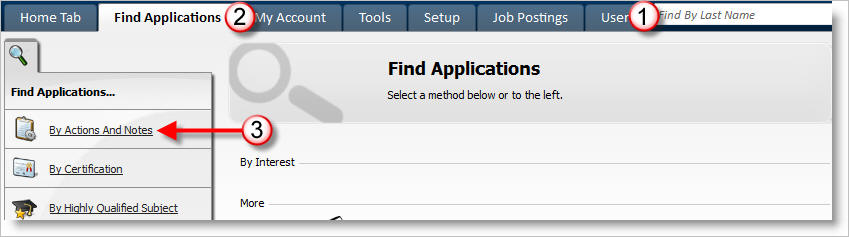
If the link within the email does not work, then a pop-up blocker may be installed which prevents the link from working. In this case, the user could go to the General ASP web site and log onto site with user name and password and follow these steps:
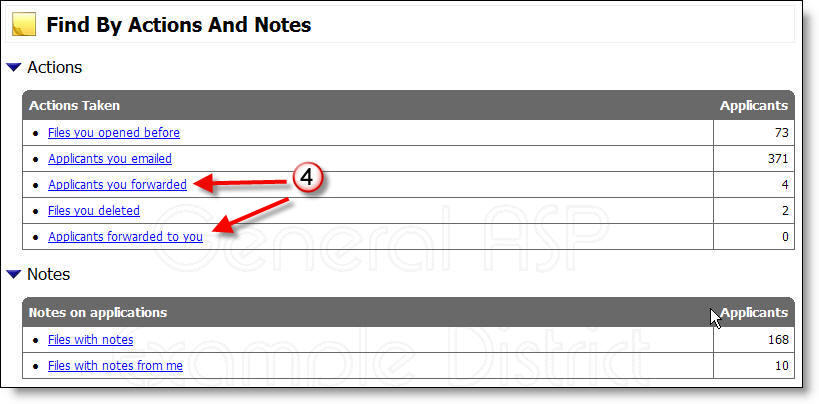
4. Click on Applicants you forwarded or Applicants forwarded to you.